
Server Power Supplies – High-Quality PSUs for Servers
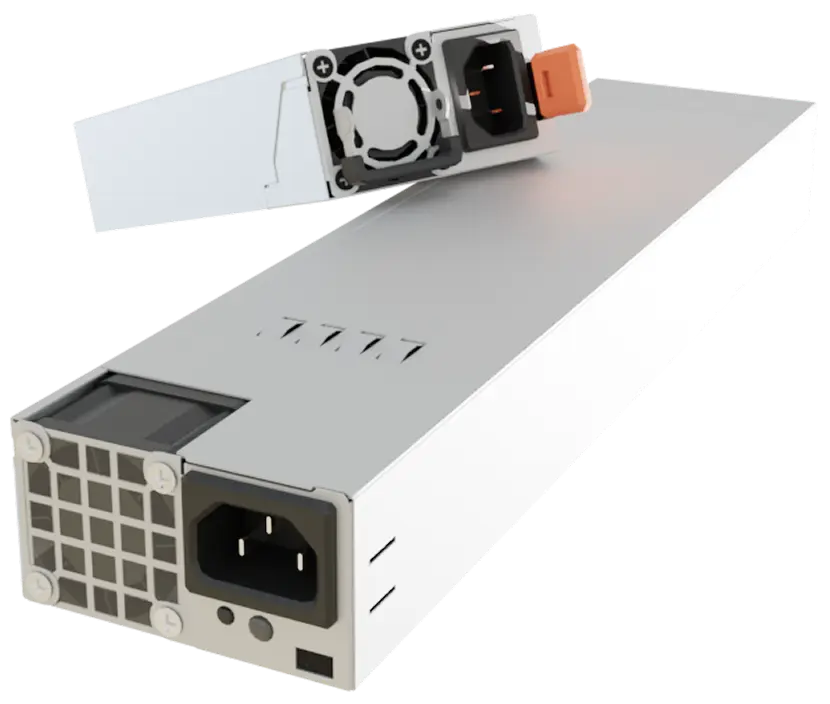
Server Power Supply Prices

Eaton
EL1600USBDIN Eaton 1600 USB DIN 1600VA Offline (Standby) UPS/USV
Out of stock


ROLINE
19.40.1069 ROLINE ProSecure III 1000 RM2HE 1000VA Online (Double-Conversion) UPS/USV
Out of stock

Huawei
02314APU Huawei PAC1000S56-EB Active 1000W PSU
Out of stock

Supermicro
PWS-1K02A-1R Supermicro 1000W 1U PSU
Out of stock

Eaton
9SX8KI Eaton 8000i 8000VA Online (Double-Conversion) UPS/USV
Out of stock

Supermicro
PWS-741P-1R Supermicro 740W 1U PSU
Out of stock

Eaton
9SXEBM36T Eaton Online (Double-Conversion) UPS/USV
Out of stock

Supermicro
PWS-2K63A-1R Supermicro Active 2600W 1U Server PSU
Out of stock


Eaton
EL500IEC Eaton 500 IEC 500VA Offline (Standby) UPS/USV
Out of stock

APC
SMT750RMI2U APC Smart-UPS 750 LCD 750VA Line-Interactive UPS/USV
Out of stock

APC
SRTL1500RM4UXLI APC 1500VA Online (Double-Conversion) UPS/USV
Out of stock

Supermicro
PWS-601-1H Supermicro Active 600W ATX Server PSU
Out of stock

Eaton
9SX3000 Eaton 3000 3000VA Online (Double-Conversion) UPS/USV
Out of stock

Supermicro
PWS-407P-1R Supermicro Active 400W 1U Server PSU
Out of stock

PowerWalker
10121120 PowerWalker VI 600 CSW IEC 600VA Line-Interactive UPS/USV
Out of stock


Gigabyte
GP-P650SS Gigabyte Active 650W ATX Desktop PSU
Out of stock


APC
SRV1KRILRK APC 1000VA On-line UPS/USV
Out of stock


Eaton
5E900UD Eaton 5E Gen2 UPS USB DIN 900VA Line-Interactive UPS/USV
Out of stock
Can't find the right product from "Server Power Supply"?

Frequently Asked Questions about Server Power Supply Unit:
No, desktop power supplies are not designed for continuous 24/7 operation. This applies to all server components, which are built for high durability and reliability.
Yes, both power supplies should be actively powered. Ideally, they should be connected to different power circuits to ensure uninterrupted failover in case of a failure.
First, check whether the power supply is connected to a working power circuit. If problems persist, test it with a power supply tester or replace it temporarily with a working model.
Calculate the total power consumption of all components—including CPU, GPU, hard drives, RAM, and fans—and add an additional 20–30% buffer to ensure a stable power supply.
Active redundancy: Both power supplies run simultaneously and share the load. If one fails, the other must take over the full load, which should be considered in power planning. Passive redundancy: Only one power supply is active at a time, while the other remains on standby and takes over only in case of failure.
According to EU regulations, since January 1, 2024, servers must be equipped with Titanium-certified power supplies. There are only a few exceptions to this requirement.
Types of Server Power Supplies for Your Power Management
Choosing the right Server Power Supply affects performance, maintenance, and operating costs. Important factors include modularity, redundancy, and energy efficiency.
- Modular vs. Non-Modular Power Supplies: Modular power supplies allow flexible cabling, improve airflow, and make maintenance easier. Non-modular models have permanently attached cables, simplifying installation but offering fewer customization options. In professional IT environments, modular Server Power Supplies are usually the better choice.
- Redundant Power Supplies for Maximum Reliability: Redundant Server Power Supplies consist of two or more units. In case of failure, the second power supply automatically takes over. Hot-swappable models allow replacement during operation without downtime or rebooting.
- High-Efficiency Power Supplies with 80 PLUS Certification: Efficient power supplies reduce electricity costs and heat generation. 80 PLUS-certified models achieve efficiency rates of over 90%, providing long-term energy savings. Depending on the certification level—Bronze, Silver, Gold, Platinum, or Titanium—businesses benefit from a sustainable and cost-efficient power supply.
Key Factors When Selecting a Reliable Server Power Supply
Choosing the right power supply affects a server's performance, stability, and operating costs. There are several factors to consider when making your selection.
- Power Output (Wattage): The power supply must reliably support all components while offering sufficient reserves for future expansions. Too little power leads to instability, while an oversized power supply results in unnecessary costs.
- Compatibility: Not every power supply fits every server. Manufacturers have specific requirements for connectors and specifications. Ensure compatibility with your existing hardware.
- Efficiency and Heat Management: Efficient power supplies reduce energy costs and heat generation, easing the cooling system and extending the lifespan of server components.
- Safety Features: Protection mechanisms such as overload, short-circuit, and surge protection safeguard hardware from damage and prevent failures—particularly crucial for mission-critical IT systems.
- Form Factors: Power supplies must fit the server chassis. EPS12V is common for larger servers, while EPS1U and ERP2U4 are designed for compact 1U and 2U enclosures. The right choice ensures smooth installation and stable operation.
Maintenance Tips to Extend the Lifespan of Server Power Supplies
Regular maintenance and optimal cooling are essential for maximizing the lifespan of a Server Power Supply. Key factors to consider include:
- Airflow and Cooling: Adequate ventilation prevents overheating and extends the lifespan of components. Ensure that the server room is well-ventilated and that cooling vents are not blocked.
- Avoiding Dust and Contamination: Dust can clog fans and components. Regularly clean the power supply with compressed air to ensure efficient cooling.
- Regular Load Testing: A power supply that operates at its maximum capacity for extended periods wears out faster. Regularly check power load and upgrade to a higher-capacity model if necessary.
- Ensuring a Stable Power Supply: Voltage fluctuations or power outages can damage power supplies. A UPS (Uninterruptible Power Supply) protects against sudden failures and increases operating security.
- Maintenance and Replacement Intervals: A power supply should be inspected every 3–5 years and replaced if there are signs of overheating, unusual noises, or unstable performance.
Server Hardware is your expert for high-performance IT solutions – from power supplies for servers to storage servers and storage devices solutions to rack infrastructure, server GPUs and Intel Xeon servers or AMD EPYC servers. Trust our experience in server software, network technology and state-of-the-art server hardware – we provide you with individual and expert advice!
Not Sure Which High-Quality Server Power Supply is Right for You? We are happy to assist you in finding the best Server Power Supply for your needs. Contact us today for expert consultation!